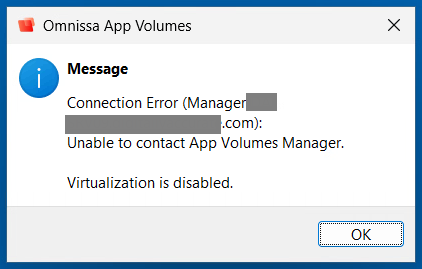
After installing the November 2026 Windows Updates on your Omnissa Horizon gold images, you may notice during login an error message reporting “Connection Error (Manager FQDN): Unable to Contact App Volumes Manager.”
The Problem
This issue is caused because Omnissa App Volumes uses NTLM authentication for the agent contacting the App Volumes Managers, and changes were made to Ntlm authentication with the November 2026 Windows Updates.
As part of the November 2026 Windows Updates, Microsoft has implemented NTLM signing security improvements in Windows, which requires signing on NTLM requests.
Specifically reaching “Phase 1 (November 10, 2026): Windows client devices begin offering NTLM signing on all connections by default. Servers accept both signed and unsigned clients. Auditing events identify clients not using signing.”
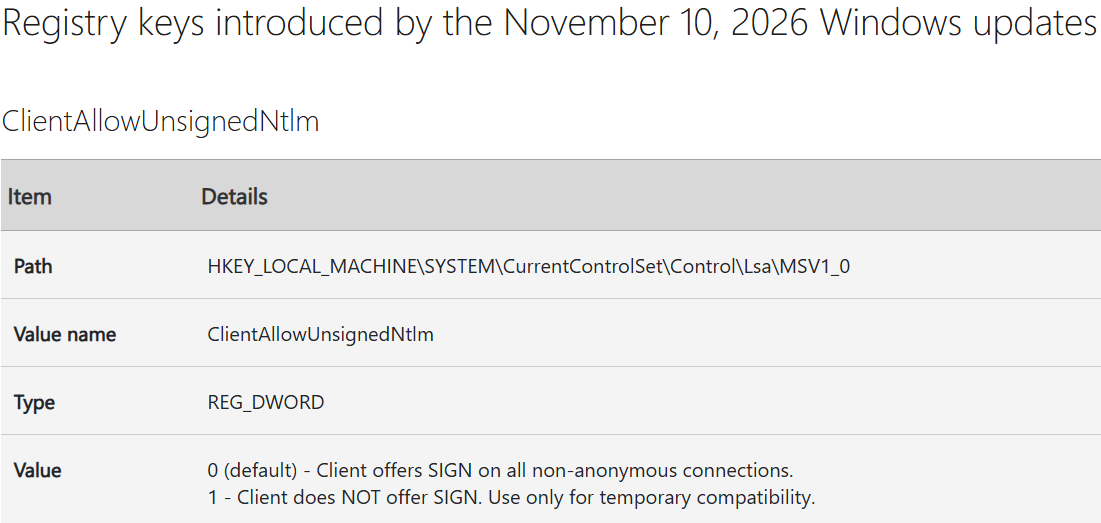
New registry keys were enabled as part of this implementation of NTLM signing. Specifically the “ClientAllowUnsignedNtlm” key.
The Fix (Workaround)
To workaround this issue, we must use the new registry settings to modify Ntlm authentication settings. Please note, changing these settings modifies and/or adjusts your security settings. Do not perform these actions unless you are aware of what this does and how it may change your security posture.
To resolve in our environment we used the “ClientAllowUnsignedNtlm” and set it to “1” which sets the mode “Client does NOT offer SIGN. Use only for temporary compatibility”.
Registry Location:
HKEY_LOCAL_MACHINE\SYSTEM\CurrentControlSet\Control\Lsa\MSV1_0We create a “REG_DWORD” and set it to “0”:
ClientAllowUnsignedNtlm = 0After setting this, creating a snapshot and pushing it, App Volumes went back to a functional state.